What Are Google Local Services Ads?
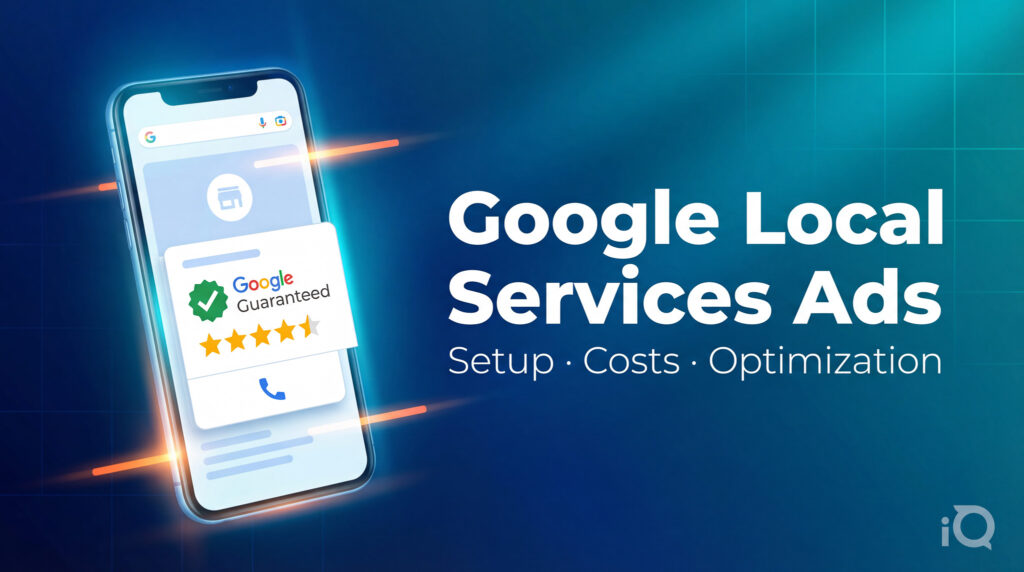
Google Local Services Ads (LSAs) are pay-per-lead placements that appear at the very top of Google search results — above traditional Google Ads, above the Local Pack, above organic listings. Unlike traditional Google Ads where you pay per click, with LSAs you pay per lead — meaning you’re charged only when a potential customer calls or messages you directly through the ad.
LSAs display your business name, rating, review count, years in business, and a “Google Screened” or “Google Guaranteed” badge, depending on your industry. That badge is meaningful. It signals to searchers that Google has verified your business through background checks and license verification — which is a trust signal that no amount of ad spend can replicate on its own.
The short answer on LSA meaning in marketing: LSAs are Google’s closest product to a curated referral — you’re not just buying visibility, you’re buying a Google-endorsed introduction to someone actively searching for your service right now.
If you’re a service-area business and you’re not running LSAs, you are quite literally paying to finish second. This guide covers everything you need to know: how LSAs work, what they cost, how your phone response score affects your visibility, and the optimization moves that separate businesses getting consistent LSA leads from those wondering why the phone isn’t ringing.
How to Set Up Google Local Services Ads
Setup is more involved than a standard Google Ads campaign, and that friction is intentional — it’s what makes the Google Guaranteed badge worth something.
Step 1: Check Eligibility
LSAs are available for a specific list of service categories — home services, legal, healthcare, financial services, real estate, and several others. Before investing time in setup, confirm your business category qualifies at ads.google.com/local-services-ads.
Step 2: Create Your LSA Profile
You’ll build a business profile that includes your service area (by zip code, city, or region), the specific services you offer, your business hours, and your service categories. Be precise here — the tighter your service area, the more relevant your leads will be.
Step 3: Complete the Verification Process
This is the step most businesses underestimate. Depending on your industry, Google will require:
- Background checks on business owners and employees
- License verification
- Insurance certificates
- Professional certifications (in some cases)
Processing can take several weeks. Build that into your timeline.
Step 4: Set Your Weekly Budget
LSA budgets are set weekly, not daily. Google estimates the number of leads your budget can generate based on local demand. Start conservatively — you can increase once you’ve established your baseline cost-per-lead in your market.
Step 5: Go Live and Monitor
Once approved, your ads can go live. The work, however, is just beginning.
What Do Google Local Services Ads Cost?
LSA pricing is lead-based, and costs vary significantly by industry, location, and competition. Here’s a realistic picture:
- Home services (HVAC, plumbing, electrical, roofing): approximately $20–$150 per lead depending on your market
- Legal services (particularly personal injury): several hundred dollars per lead
- Competitive metro markets like Orlando: costs trend toward the higher end of any category’s range
A few things worth knowing about LSA cost structure:
You can dispute invalid leads. If a lead calls about a service you don’t offer, or is clearly spam or a misdial, you can dispute it within 30 days and receive a credit. Businesses that don’t dispute aggressively leave real dollars on the table.
Lead costs fluctuate with competition. Google’s algorithm factors in local competition when pricing leads. If a major competitor pauses their LSA campaign, your cost-per-lead may drop. If a new competitor enters your market, expect upward pressure.
Charging doesn’t always mean converting. A lead is a connection, not a customer. Your follow-up speed and process determine what percentage of those paid connections actually become revenue.
What Is the LSA Phone Response Score — and Why Does It Control Your Rankings?
The phone response score is the most misunderstood element of LSA optimization, and it’s the one that most directly affects how often your ad appears.
Google tracks whether you answer calls that come through your LSA, and how quickly. Your response rate — the percentage of LSA calls you answer — feeds directly into your ad ranking. Businesses that consistently answer calls rank higher. Businesses that miss calls get pushed down.
Think about the incentive structure Google has built here. Their reputation is attached to every LSA referral through the Google Guaranteed badge. If Google sends a customer to your business and you don’t answer, that’s a poor experience Google is implicitly responsible for. The phone response score is their mechanism for filtering out businesses that won’t deliver on the promise.
What this means practically:
- During your listed business hours, answer every LSA call — every one
- If you’re a one- or two-person operation, set up call forwarding so calls don’t go unanswered when you’re on a job
- If you do miss a call, return it immediately — Google counts returned calls in their assessment
- Consider adjusting your ad schedule to only run during hours you can reliably answer
A strong phone response score is not just a ranking factor — it’s a revenue multiplier. The businesses ranking at the top of LSA results in your market almost certainly have response rates above 90%. That’s the bar.
LSA Reviews: The Compounding Advantage
Your LSA profile displays your Google review count and star rating. This is not decoration — it directly influences consumer behavior and is a ranking signal.
LSA reviews are a separate review stream from your standard Google Business Profile reviews. Customers who find you through LSA can leave reviews directly on your LSA profile, and over time those reviews accumulate independently.
The compounding nature of LSA reviews matters strategically. A business with 200 LSA reviews and a 4.8 rating will consistently outperform a competitor with 20 reviews and a 4.9 rating — the volume signals sustained customer experience at scale in a way that a small sample can’t replicate.
Request LSA reviews deliberately. After a job closes, send a direct link to your LSA review page. Make it frictionless. The businesses winning the LSA review game aren’t winning because they have better customers — they’re winning because they ask more consistently.
How to Optimize Your LSA Campaign
Setup gets you in the game. Optimization is how you win it.
Audit your lead quality regularly. Set a recurring calendar reminder to review your leads weekly. Dispute anything invalid promptly. Look for patterns — certain zip codes generating low-quality leads, certain services attracting calls that don’t convert. Use that data to refine your service area and category selections.
Match your ad schedule to your answer capacity. Don’t run ads at 7 PM on a Friday if no one will answer. An unanswered call hurts your response score and wastes money. Tight ad scheduling is not a limitation — it’s a quality signal.
Keep your profile current. Google surfaces LSA profiles that are complete and recently updated. If you add a new service, add it to your LSA profile. If your service area expands, update it. Stale profiles get less visibility.
Use the LSA lead inbox actively. Google’s LSA dashboard lets you track leads, mark them as booked or not booked, and add notes. This data feeds back into how Google evaluates your account. An active, well-maintained lead inbox signals an engaged business — and engaged businesses rank better.
Pair LSAs with your Google Business Profile. They’re separate products but complementary assets. A robust Google Business Profile with strong reviews, consistent NAP (name, address, phone) information, and recent posts creates a halo effect that benefits your LSA standing. Treat them as a system, not silos.
LSAs vs. Google Ads: Which One Should You Run?
The honest answer is both, if your budget allows — but they serve different purposes.
Google Ads give you control: keyword targeting, ad copy, landing pages, audience layering, remarketing. They’re a precision instrument for reaching people at specific moments in the funnel.
LSAs are simpler and more trust-forward. You don’t control the ad creative — Google generates it from your profile. What you get in return is positioning above everything else on the page, the Google Guaranteed badge, and a pay-per-lead model that aligns your cost structure with actual business intent.
For service businesses targeting high-intent, ready-to-hire customers, LSAs often produce a lower effective cost-per-acquisition than traditional Google Ads — particularly in competitive markets where click costs are high. The two products complement each other well when managed with intention.
Frequently Asked Questions About Google Local Services Ads
What does LSA mean in marketing?
LSA stands for Local Services Ads — a Google advertising product designed for local service businesses that charges per verified lead rather than per click. The “Google Guaranteed” or “Google Screened” badge attached to LSA listings signals that Google has verified the business’s credentials.
How do I improve my LSA ranking?
The primary factors are your phone response score (answer your calls), your review count and rating, your proximity to the searcher, and your budget relative to local competition. Answering calls consistently and actively requesting LSA reviews are the highest-leverage actions most businesses can take.
What is the Google LSA phone response score?
It’s a metric Google uses to track how reliably you answer calls that come through your Local Services Ads. A high response rate is rewarded with better ad placement. Businesses that frequently miss LSA calls will see their ranking decline.
Can I dispute an LSA lead?
Yes. If a lead is spam, a wrong number, a call about a service you don’t offer, or a duplicate, you can dispute it within 30 days of the charge. Valid disputes result in a credit to your account.
How much do Local Services Ads cost?
Cost per lead varies by industry, location, and competition. Home services leads typically range from $20–$150. Legal and financial services leads can run significantly higher. In competitive markets like Orlando, costs trend toward the upper end of the range for most categories.
Do I need a separate budget for LSAs and Google Ads?
Yes. They are managed through separate platforms (LSAs through the Local Services Ads dashboard, Google Ads through Google Ads Manager) and have separate billing. Most businesses allocate budget to each independently based on performance goals.
The Bottom Line
Google Local Services Ads are one of the most direct mechanisms available for connecting local service businesses with ready-to-hire customers. When set up correctly, maintained actively, and optimized around phone response and review generation, they reliably produce qualified leads at a cost that often beats other paid channels.
The businesses dominating their local LSA markets aren’t doing anything exotic. They answer their phones, they ask for reviews, and they stay on top of their lead inbox. That consistency compounds over time into a ranking advantage that’s genuinely difficult for competitors to displace.
If you want help setting up, auditing, or optimizing your LSA campaign — including pairing it with a broader local search strategy — iQuarius Media works with service businesses across Central Florida and beyond to build local search programs that generate measurable revenue.
“`